Blog
Rhycon
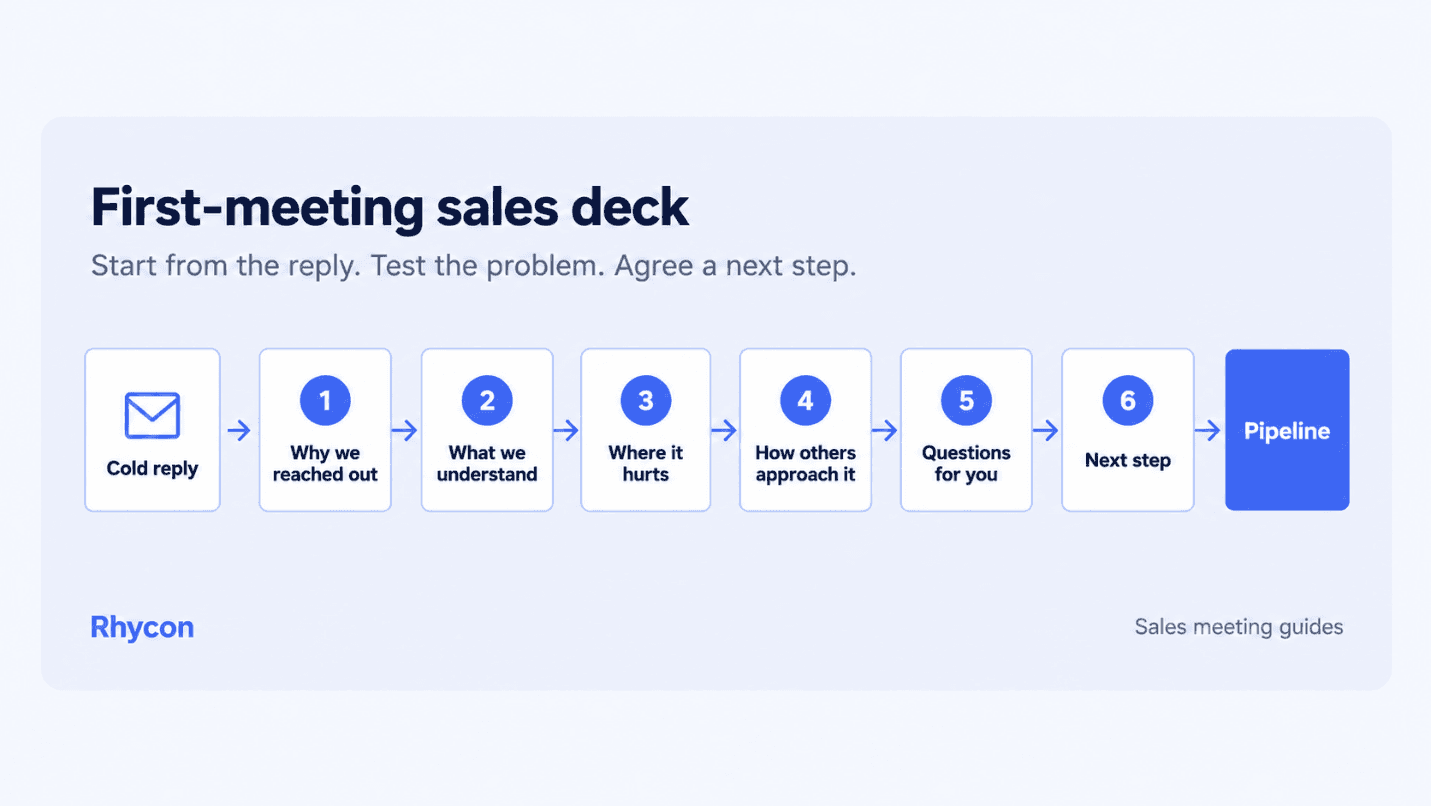
Turn a cold email reply into a useful first sales meeting. Use Rhycon’s research, a six-slide structure and an optional Perceptis deck workflow.
A first-meeting sales deck is a short sales presentation for the first call after a cold email reply. It explains why you reached out, tests possible pain points and proposes a next step. A sales rep should use it to support discovery and let the buyer correct assumptions.
Start with the buyer’s reply and the research behind your Rhycon outreach. Use the six-slide structure, example and checklist below to plan the meeting. Perceptis is an optional tool for turning those notes into slides.
Should you use a deck in a first sales meeting?
Use a deck when it helps the buyer talk. Start with four to six slides built around questions.
Slides can give new attendees context and make complex ideas easier to discuss. Spend more time listening than presenting slides. Follow the buyer’s questions when the conversation changes direction.
Use one relevant case study as social proof once the buyer confirms the problem. Explain its context and source to build credibility. Save detailed product features for an appendix.
Skip the deck when
the buyer asked one specific question that you can answer in conversation, without slides;
the call is an informal one-to-one conversation;
you have no research beyond the company name and the reply.
Use a short deck when
more than one stakeholder is joining, especially people outside the original thread;
the buyer asked for an example, an overview or “how this would work for us”;
the offer is complex enough that a visual helps the buyer react to it.
What should a first-meeting sales deck include?
Give each slide one job. The key points should follow the buyer’s situation, the questions still open and a proposed next step.
Slide | Purpose | Content | Where it comes from |
|---|---|---|---|
1. Why we reached out | Reconnect to the thread | The trigger, its date and source, and the buyer’s reply in their own words | Original research and the reply |
2. What we understand | Show preparation and invite correction | Three observed facts about the company, with hypotheses clearly labelled | Prospect research |
3. Where we think it hurts | Test your hypothesis | Two or three likely problems, written as questions | Your offer and the signal |
4. How others approach it | Give context without pitching | One approach or pattern, plus one proof point you can verify | Case studies or your own data |
5. Questions for you | Hand the meeting to the buyer | Three to five discovery questions | Your unanswered qualification fields |
6. Proposed next step | Agree what happens next | One action, one owner and a date | Your sales process |
If you have little account information, use only the reply and a few sourced facts. Label possible problems as questions. Skip the deck if you lack enough context for a useful discussion.
Write slide titles as useful observations or questions. “How will your Nordic launch affect each AE’s territory?” invites a response. “Company overview” offers little direction.
Keep two or three appendix slides ready for product questions. Use data visualizations only when they clarify evidence, with labels and sources the buyer can check.
How do you turn a cold reply into the deck?
Build from the buyer’s exact reply, the original buying signal and your unanswered questions.
Start from the buyer’s words. Quote their reply on the opening slide and answer any specific request early.
Re-check the signal. Confirm its source, date and relevance before the call. Check that your contact still holds the role. Use the B2B buying signals guide to judge the evidence.
Separate facts from hypotheses. Record sources and dates for observed facts. Write interpretations as questions to confirm. The sales prospect research checklist gives a format for both.
Turn unknowns into questions. Ask about budget, timing, stakeholders and the current process. Check whether your offer solves a problem the buyer confirms.
Propose one next step. Make the call to action specific: one action, an owner and a date. Choose a next step that matches the buyer’s stage and what they agree during the meeting.
When an SDR books the meeting, use the SDR-to-AE handoff checklist to transfer context to the AE.
Fictional example: from reply to slide titles
This company, contact and conversation are fictional. The example demonstrates the method, not a customer result.
Input | Fictional entry |
|---|---|
Account and contact | Northvale Freight; Elena Varga, newly appointed Chief Revenue Officer |
Signal | Series B announcement and a new CRO, both in the last 60 days |
Outreach angle | Hypothesis to test: a new CRO may be reviewing the outbound process |
Exact buyer reply | “Timing is right. I’m rebuilding our outbound plan for Q1. Show me what this would look like for a team of six SDRs.” |
Unknowns | Budget, current tools, who else signs off, Q1 targets |
The resulting slide titles:
You are rebuilding Northvale’s outbound plan for Q1 with a team of six SDRs
Could the funding round and new CRO change your pipeline targets?
Where does your SDR team spend the most time: list building, research or reply handling?
One option to test: automate research before expanding to sending and replies
What does Q1 success look like, and who else needs to agree the plan?
Next step: a 30-minute working session with your sales operations lead before 15 November
The first title repeats the buyer’s plan. The next three test assumptions and an approach. The final two address open questions and propose a next step.
How can AI help you build the deck?
AI can help structure and format a first draft from your notes. Sales teams still need to check the evidence, wording and layout. Choose a tool based on four things:
Your inputs. It should use the reply, research and approved case studies, not just a one-line prompt.
Visible sources. You need to check where each factual claim comes from.
Editable output. Choose a format your team can revise, such as PowerPoint or Google Slides. Check how well the tool preserves your template.
Workflow fit. Check plan limits and whether an add-in or connector supports the tools you use.
Using Perceptis AI
Perceptis AI creates editable PowerPoint decks with action titles. It supports native charts and tables, a PowerPoint add-in and an MCP connector for AI assistants.
Perceptis says it adds citations from uploaded material or the web. Open each source and check the claim before using the slide. Review the layout and wording too.
The Pro plan adds a corporate theme and Knowledge Base. Reps can store approved case studies and product one-pagers there and reuse them.
Perceptis states that it is SOC 2 Type II compliant. It says it does not train on customer data and isolates customers’ documents. See its Trust Center. Upload only material your company approves.
Example prompt
Build a six-slide first-meeting deck for [company]. Quote this reply: [reply]. Use these notes and cite each fact: [research]. Present hypotheses as questions. Include this approved proof point: [case study]. End with [action, owner and date]. Use action titles.
Perceptis offers a free plan. Paid plans start at $29 per month; corporate themes and the Knowledge Base start with Pro at $129 per month. Check Perceptis pricing for current limits.
Copyable first-meeting deck checklist
Fill this in before building the deck. Copy it into your CRM or meeting notes.
Preparation item | Entry |
|---|---|
Account and contact | — |
Contact’s current role, checked on | — |
Original buying signal and source | — |
Signal date and date re-checked | — |
Buyer’s exact reply | — |
Question or request in the reply | — |
Observed facts for “What we understand” (with sources) | — |
Hypotheses for “Where we think it hurts” (labelled) | — |
Proof point for “How others approach it” (verifiable) | — |
Open qualification questions for “Questions for you” | — |
Attendees, and who was not on the thread | — |
Proposed next step, owner and date | — |
Appendix slides ready if asked | — |
Common first-meeting deck mistakes
Reusing a generic pitch. A logo swap does not make a deck relevant to potential customers. Connect the opening to their reply.
Treating guesses as facts. Label hypotheses and invite the buyer to correct them.
Using a stale signal. Check the event and contact’s role again before the call.
Too many slides. Leave enough time for the buyer’s questions.
No next step. Agree an action, an owner and a date.
Unverifiable proof. Use a result you can source and explain, or leave it out.
How Rhycon and Perceptis fit the workflow
Rhycon supports prospect discovery, contact verification, buying-signal research, outreach, reply handling and meeting booking. Perceptis helps turn the notes into a deck.
The handoff is manual. Copy the signal, source and date from Rhycon into Perceptis, along with your research notes and the buyer’s reply. To explore the outreach workflow, see how Rhycon works and complete the onboarding. When preparing a meeting, you can use Perceptis AI for the draft.
Frequently asked questions
How many slides should a first-meeting sales deck have?
Start with four to six. Adjust to the conversation and keep detailed product information in an appendix.
Should a first-meeting deck include pricing?
Share published pricing or answer pricing questions early. If the price depends on scope, explain the model and give a qualified range when possible. State what needs confirming before a firm quote.
What is the difference between a sales deck and a pitch deck?
Sales pitch decks present an offer and its benefits. A first-meeting sales deck focuses on one account, tests assumptions and supports discovery. An investor pitch deck serves a different purpose: making the case for funding.
Guest contribution from Perceptis, edited by Rhycon.
Ready to book more meetings?