

Cold email metrics are the counts and rates used to assess outreach, from human replies and qualified conversations to meetings and accepted opportunities. A useful report shows where prospects stop progressing and which outcomes matter to the sales team.
It cannot do that if “reply” includes automated responses, “meeting” mixes bookings with attendance or “conversion” changes its denominator from one chart to the next.
Start with a shared measurement dictionary. The definitions below are a proposed reporting convention. Your tools may use different labels, so reconcile their definitions before combining reports.
Cold email metrics at a glance
Human replies: Did a person respond, after automated replies are excluded?
Positive replies and qualified conversations: Did the response show relevant interest, and did it meet the agreed criteria for progression?
Booked and held meetings: Was a meeting arranged, and did it actually happen?
Accepted opportunities: Which distinct opportunities did the sales team accept under its qualification rule?
Cost per accepted opportunity: How much defined cohort cost was required for each accepted opportunity?
Use the dictionary and worked example below to calculate these consistently. Keep pipeline value and won revenue as separate later outcomes.
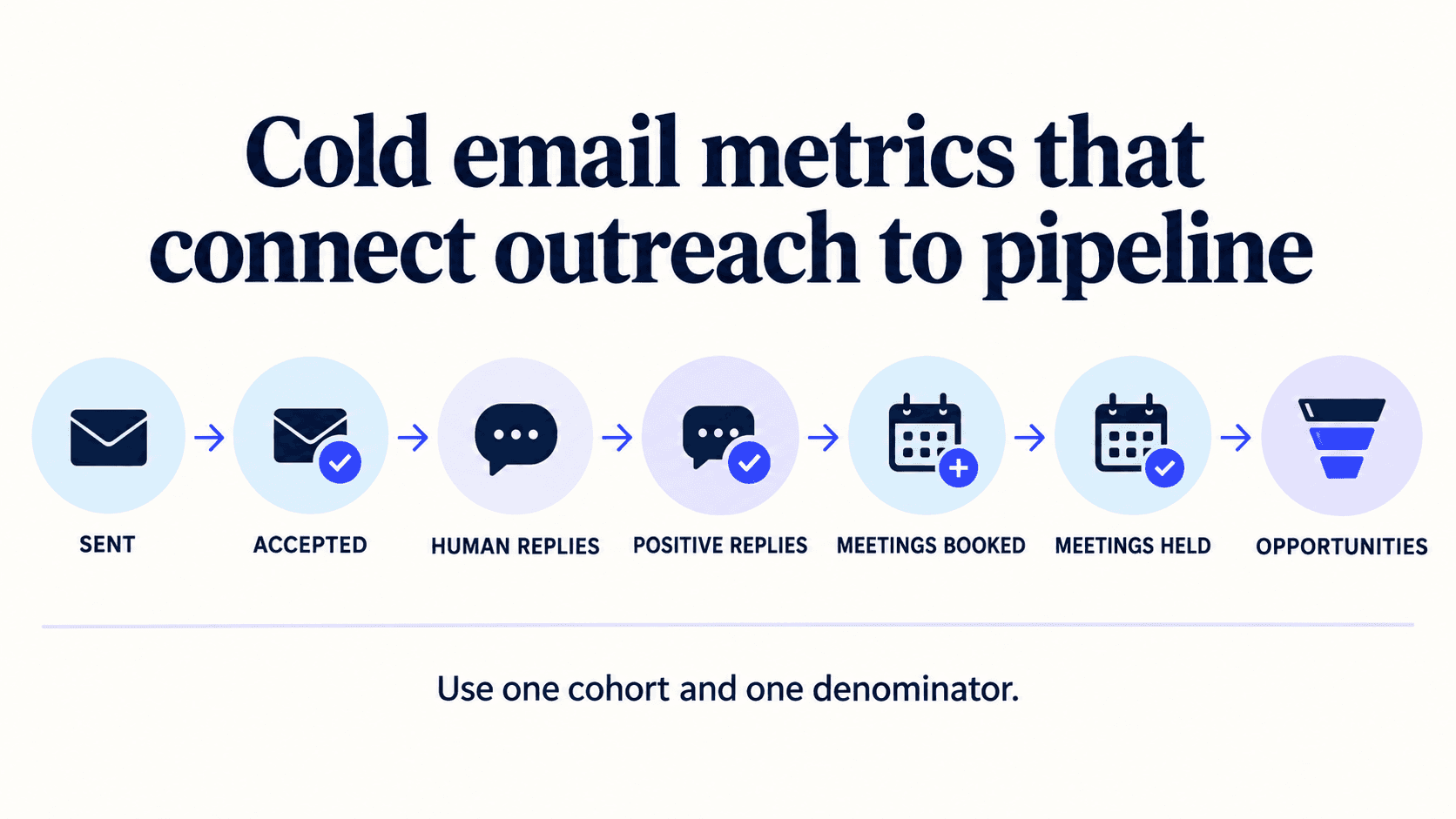
Define the cohort first
A cohort is the group whose progress you are following. Record who entered it, the inclusion rule, the campaign or treatment, and the observation period.
Distinguish people from accounts. Three contacts at one business do not automatically represent three sales opportunities.
Give a cohort enough time to progress before comparing it with an older one. A meeting scheduled for next month should not be classified as a no-show today.
Separate message counts from people
A sequence can send several messages to one person. Use message-level counts for operational sending diagnostics and unique-person or unique-account counts for the relevant sales outcomes.
For a person-level reply rate, count each person once even if they reply several times. For a campaign with overlapping membership, decide how a person is assigned or attributed before calculating totals.
When comparing sequence stages, record what each message added and which event ended the sequence. The cold email follow-up planning checklist helps define those message and stop rules before you compare results.
A system reporting that a recipient server accepted a message does not prove that it reached the inbox. Label acceptance or inferred delivery according to what the underlying event actually establishes.
Use a measurement dictionary
Human reply rate
Proposed definition: Unique people with a human reply divided by the stated contacted-person cohort
Exclusions or caveats: Exclude out-of-office and other automated replies
Positive reply rate
Proposed definition: Unique people whose response expresses relevant interest divided by that same cohort
Exclusions or caveats: Apply a documented classification rule; not every reply is interest
Qualified-conversation rate
Proposed definition: Unique people meeting the agreed conversation criteria divided by the same cohort
Exclusions or caveats: Criteria must remain consistent
Booking rate
Proposed definition: Unique people with an agreed meeting booking divided by the same cohort
Exclusions or caveats: Separate cancellations, future meetings and reschedules
Held-meeting rate
Proposed definition: Unique people with a completed meeting divided by the same cohort
Exclusions or caveats: Do not count a rescheduled meeting twice
Opportunity outcomes
Proposed definition: Accepted opportunities associated with the cohort
Exclusions or caveats: Deduplicate accounts/opportunities and record attribution rules
Cost per accepted opportunity
Proposed definition: Defined cohort cost divided by accepted opportunities
Exclusions or caveats: State which labour, software and infrastructure costs are included
If a denominator is zero, report the rate as not available rather than zero. Missing observation data is also not a measured zero.
Cold email metrics and formulas
The most useful email metrics follow one group from attempted outreach to a commercial result. Keep the time window, unit and denominator beside every rate. A percentage without those details cannot be checked or compared.
Attempted, accepted and bounced messages
Attempted messages count the sends your system tried to make. Accepted messages count messages the receiving server accepted. Server acceptance is an operational event. It does not prove inbox placement or that a person read the message.
Bounce rate = bounced messages / attempted messages × 100. Split hard bounces from temporary failures when your provider exposes both. A hard bounce can indicate an invalid or unavailable address. A temporary failure can reflect a full mailbox, a rate limit or another short-term condition.
High bounce rates are a reason to stop and inspect the source, verification date and sending setup. Check whether the email addresses were current when the cohort started. Do not delete failed records before you can explain what happened. Suppress addresses that should not be retried.
Human, positive and qualified replies
Cold email reply rate = unique people with a human reply / the stated contacted-person cohort × 100. Remove out-of-office messages, automated security responses and other machine-generated mail. Count one person once even when the thread contains several replies.
A reply can be positive, neutral, negative or a request to stop. Define the classes before reviewing cold email campaigns. A positive reply shows relevant interest or a useful next step. A qualified conversation also meets the team’s progression criteria. Those are different decisions.
The reply rate tells you whether people respond. It does not tell you whether the targeting was good. If many replies say the offer is irrelevant, inspect the audience, research and pain point before changing subject lines.
Clicks and call-to-action responses
Click through rate = unique people with a recorded link click / the stated cohort × 100. Use it only when a click is part of the intended path. A cold email with a reply-based call to action may produce good conversations without many clicks.
Bot and security scanners can visit links. A click is therefore an event to investigate, not proof of buyer intent. Compare it with the reply, requested information and later conversation. Keep link tracking and privacy choices consistent across the cohorts you compare.
Meetings, opportunities and conversion
Booking rate = unique people with an agreed meeting / the stated cohort × 100. Held-meeting rate = unique people whose meeting occurred / the same cohort × 100. Keep booked, cancelled, rescheduled and held meetings separate.
Cold email conversion rate is too vague unless you name the result. A rate for cold email can mean positive replies, meetings booked, meetings held, accepted opportunities or won deals. Write the event into the label, such as “held-meeting rate,” and keep the denominator beside it.
Use account or opportunity units for pipeline. Several people from one account can reply, but that does not create several opportunities. Deduplicate before summing value or reporting conversion rates.
Why opens should not define success
An open event is not a reliable equivalent of a person reading a message. Apple’s Mail Privacy Protection can download remote content in the background and obscure whether a user opened the message. That limits what a tracking pixel can establish. Apple’s explanation.
Use opens, where available, as a qualified diagnostic rather than evidence that an account is interested. Replies and later outcomes still need their own definitions.
How to interpret rates in cold email
There is no universal “good” result for every market. Rates in cold email change with the audience, offer, data quality, sender history, message, region, timing and definition. A small group of carefully researched accounts should not be judged against a broad email list with a different purpose.
Treat open data as a diagnostic
Average open rates from a vendor report may describe a different mix of senders and tracking methods. Cold email open rates can also be distorted by privacy tools, image blocking and automated systems. Use the event to find a large technical change, such as a tracking failure. Do not use it as the main measure of cold email success.
If opens fall while human replies and held meetings remain steady, the open-rate change may not matter. If replies fall at the same time as server rejections or bounces rise, inspect sending health and list quality first.
Change one important variable at a time
When cold email performance weakens, teams often rewrite everything at once. That makes the next result hard to explain. Hold the cohort rule and measurement window steady. Then test one meaningful change, such as the account segment, evidence used, offer, subject line, first sentence or call to action.
Subject lines can affect attention, but they cannot repair a poor list or irrelevant offer. A clear subject line should match the message and avoid pretending that an earlier conversation took place. The body should connect a verified observation to a relevant problem and give the recipient a simple way to respond.
Compare mature cohorts
A cohort is mature when enough time has passed for the outcome being measured. Replies may arrive in days. Meetings can occur weeks later. Opportunities and revenue take longer. Mark future meetings as scheduled, not missed, and keep late outcomes attached to the original cohort.
Compare like with like. Use the same unit, exclusions and observation window. If the definition changes, start a new series or annotate the break. This prevents a reporting change from looking like a performance change.
A worked example
The following numbers are fictional and illustrate arithmetic only. They are not a Rhycon benchmark or customer result.
Suppose a mature cohort contains 1,000 unique people, each at a different account. Fifty have a recorded hard bounce within the team’s stated reconciliation window. The report uses the remaining 950 people as its operational contacted-person denominator. It labels this convention explicitly; it does not claim confirmed inbox delivery.
The cohort produces:
60 unique human replies.
18 unique positive replies.
12 qualified conversations.
8 people with a meeting booked.
6 people with a meeting held.
3 accepted opportunities at three distinct accounts.
The person-level rates are:
Human replies: 60 / 950
Result: 6.32%
Positive replies: 18 / 950
Result: 1.89%
Qualified conversations: 12 / 950
Result: 1.26%
Meetings booked: 8 / 950
Result: 0.84%
Meetings held: 6 / 950
Result: 0.63%
Positive replies as a share of human replies would be 18 / 60 = 30%. That is a different metric from the 1.89% positive reply rate above. Both can be useful if they are named clearly.
If the defined cost for this cohort were £3,000, its cost per accepted opportunity would be £1,000. That says nothing by itself about profitability: the opportunities have not necessarily closed.
If another report used all 1,000 attempted people as the denominator, its percentages would differ. Do not compare those rates until the reporting conventions agree.
Connect cold email to pipeline with an attribution rule
Keep a record linking each accepted opportunity to its account, relevant contacts and campaign cohort. Include the opportunity ID, acceptance date, stage, recorded value, currency and the date of the reporting snapshot.
Agree what counts as outbound-sourced before reporting it: for example, a new opportunity whose first qualifying conversation began through this outreach. Keep outbound-influenced opportunities separate when outreach contributed to an opportunity that already existed. These are reporting conventions your team must define, not proof that one touch caused a sale.
Deduplicate by opportunity ID before adding pipeline value. Two contacted people attached to one opportunity should not double its value. Report pipeline at a stated stage and snapshot date, and report closed-won outcomes separately. Estimated opportunity value is not realised revenue.
Keep operational health beside commercial outcomes
Bounce events, complaints and requests to stop matter even when a campaign generates meetings. Monitor them in the systems that record and enforce those decisions.
Mailbox-provider rules also matter. Google’s sender guidelines describe requirements for mail sent to personal Gmail accounts, including authentication and additional requirements for bulk senders. Check the current source and its scope rather than treating a generic outreach dashboard as proof that all requirements are met. Gmail sender guidelines.
A deliverability percentage does not establish permission to contact a person, and technical authentication does not guarantee inbox placement.
Diagnose cold email performance by stage
The pattern across key metrics tells you where to investigate. It does not prove a single cause. Use the following checks to narrow the problem before changing a campaign.
Observed pattern | Inspect first | Useful next decision |
|---|---|---|
Bounce rate rises | Source, verification date, domain pattern and provider response | Pause the affected source or segment and correct the data rule |
Human replies fall | Targeting, evidence, offer, message and sender health | Test one likely cause in a comparable cohort |
Replies rise but positive replies fall | Reply classification, audience fit and message relevance | Refine the segment or offer before adding volume |
Bookings rise but held meetings do not | Confirmation, scheduling delay, participant fit and reschedules | Improve the booking-to-attendance workflow |
Held meetings rise but opportunities do not | Qualification criteria, handoff context and discovery outcomes | Review accepted and returned handoffs with sales |
Pipeline rises without later wins | Opportunity definition, stage quality, value and snapshot age | Wait for a mature window or tighten the acceptance rule |
Segment the report only when the group is large enough to interpret. Useful cuts may include account type, source, offer, sender, sequence version and route. Keep the total beside each rate. A 50% result from two people carries different evidence from the same result across hundreds.
Build a weekly cold email reporting view
A compact weekly view can combine operational health with sales outcomes. Use one row per cohort and preserve the raw counts behind the percentages.
Define the cohort. Record the start date, inclusion rule, audience, offer and campaign version.
Reconcile sending events. Keep attempted, accepted, hard-bounced and temporarily failed messages separate.
Classify human replies. Record positive, neutral, negative and opt-out outcomes under a written rule.
Connect sales stages. Link people to accounts, meetings and accepted opportunities without double counting.
State the snapshot date. Make it clear which later outcomes are still developing.
Record the decision. Name the owner, one change to test and the cohort that will test it.
Keep counts visible even when the dashboard emphasizes percentages. The raw numbers expose small samples and make every formula easier to audit. Keep opt-outs and complaints in the same review because commercial outcomes do not cancel operational risk.
Cold email metrics checklist before launch
Set up measurement before the first message enters a cold email outreach sequence. Retrofitting definitions later can hide missing events and create totals that no one can reproduce.
Name the business outcome. Choose the decision the campaign should support. Examples include starting qualified conversations, arranging discovery calls or creating accepted opportunities. Avoid a goal such as “increase engagement” unless the event is defined.
Choose the reporting unit. Decide whether each measure uses messages, unique people, accounts, meetings or opportunities. Record the identity used to deduplicate each unit.
Write every formula. Put the numerator, denominator and exclusions next to the metric name. State how you handle bounces, duplicate contacts, late replies, reschedules and reopened opportunities.
Define reply classes. Give reviewers examples of positive, neutral, negative, referral, out-of-office and opt-out messages. Review edge cases together until classification is consistent.
Connect the systems. Preserve a stable campaign, contact, account and opportunity identifier across the sending platform and CRM. Store the source event time and the reporting snapshot time.
Set stop and suppression rules. End sequences when a person replies, opts out, becomes invalid or enters another owned conversation. Make ownership visible so two teams do not contact the same person at once.
Record cost consistently. Decide which data, software, infrastructure and labor costs belong to the cohort. Use the same convention when comparing cost per meeting or accepted opportunity.
Test the report. Trace a small sample from source record to reply, meeting and opportunity. Recalculate the displayed rates from raw counts before relying on the dashboard.
Document the handoff rule as well as the metric. The SDR-to-AE handoff checklist shows how to preserve buyer context, qualification evidence and ownership when a conversation moves to sales.
Questions a cold email report should answer
A useful report should let a reviewer answer a small set of questions without opening several dashboards:
Which people and accounts entered this cohort, and why?
How many messages were attempted, accepted, bounced or stopped?
How many unique people replied, and how were those replies classified?
How many meetings were booked, held, cancelled or still scheduled?
Which opportunities did sales accept, and under which definition?
What costs, pipeline values and snapshot dates are included?
What changed from the comparison cohort, and what will the team test next?
If the report cannot answer these questions, add the missing event or definition before adding another chart. Reliable cold email metrics should help the team make a decision, reproduce the calculation and explain what the result does and does not show.
Make the review actionable
At each review, ask:
Are the same kinds of accounts entering the compared cohorts?
Have qualification definitions or reply classifications changed?
Did the offer, sender setup or audience change?
Are meetings being held and accepted by the sales team?
Are repeated objections pointing to a targeting or research problem?
Is enough time available to assess later stages?
Use the qualification guide to agree stage criteria. Use the AI sales-agent pilot guide when comparing a changed workflow.
Keep the report small enough to explain. A few clearly defined outcomes can support a better decision than a large dashboard whose numbers cannot be reconciled.
See how Rhycon works and complete the interactive onboarding on the Rhycon homepage, including its approach to prospect research, outreach, reply handling and meeting coordination.